Getting started: Unterschied zwischen den Versionen
Aus www.wiki.ardumower.de
(→Steps) |
|||
| Zeile 9: | Zeile 9: | ||
Here are the overall steps for building your DIY Ardumower: | Here are the overall steps for building your DIY Ardumower: | ||
| − | #[[Ardumower chassis|Assemble the chassis (motors, mower slice, blades etc.)]] | + | #[[Ardumower chassis| Assemble the chassis (motors, mower slice, blades etc.)]] |
| − | #[[Ardumower PCB|Assemble the PCB]] | + | #[[Ardumower PCB| Assemble the PCB]] |
| − | #[[Motor driver|Connect motors, battery]] | + | #[[Motor driver| Connect motors, battery]] |
| − | #[[Ardumower PCB| | + | #[[Ardumower PCB| Download software and flash the Arduino]] |
#Using Arduino serial console: | #Using Arduino serial console: | ||
| − | ##[[Ardumower PCB|Ensure motors are connected correctly]] | + | ##[[Ardumower PCB| Ensure motors are connected correctly]] |
| − | ##[[Bluetooth|Configure Bluetooth module]] | + | ##[[Bluetooth| Configure Bluetooth module]] |
#Using Android pfodApp: | #Using Android pfodApp: | ||
| − | ##[[Ardumower PCB|Calibrate battery, motors etc.]] | + | ##[[Ardumower PCB| Calibrate battery, motors etc.]] |
| − | ##[[IMU|Calibrate IMU]] | + | ##[[IMU| Calibrate IMU]] |
| − | + | ||
=Videos= | =Videos= | ||
Version vom 14. September 2014, 13:30 Uhr
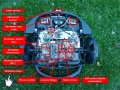
Build
Download

Run!


Steps
Here are the overall steps for building your DIY Ardumower:
- Assemble the chassis (motors, mower slice, blades etc.)
- Assemble the PCB
- Connect motors, battery
- Download software and flash the Arduino
- Using Arduino serial console:
- Using Android pfodApp:
